
Networking
CGNAT and public IPs, why port forwarding does not work, blocked ports, LAN ports and network modes.
Overview
The single most consequential fact about Starlink networking: the default IPv4 policy is CGNAT, and CGNAT does not accept inbound traffic. Almost every “I cannot host anything” question traces back to that.
IP addressing
Starlink offers two IPv4 policies.
Default (CGNAT). Clients get a private address from 100.64.0.0/10 by
DHCP, and NAT translates between that and Starlink’s public addresses. Inbound
traffic is not possible.
Public. An optional configuration for Local and Global Priority plans. The address is reachable from anywhere on the internet and assigned by DHCP.
IPv6 is native on every router, kit version and service plan. Every IPv6-capable client gets an address.
Each Starlink is allocated:
| Allocation | Delivered by |
|---|---|
| One public IPv4 address for the WAN | DHCP |
| One IPv6 /64 prefix for the WAN | SLAAC |
| One IPv6 /56 prefix for the LAN | DHCPv6-PD |
Truly static IPs do not exist. A reservation system keeps your public IPv4 and IPv6 prefix across reboots and power-offs, but moving the dish or a software update can change them.
Local Priority customers can see their public IP on the service line page at starlink.com, at the top of the Devices section above the graphs.
Switch to a public IP
Local and Global Priority plans only.
- Sign in at starlink.com/account.
- Open the Account tab.
- Choose Subscriptions on the left.
- Select the service line.
- Click Edit next to IP Policy.
- Choose Public IP and save.
- Reboot your Starlink.
On a business account the same setting is reachable from Dashboard → Service Line → your Starlink → IP Policy.
Customers in Austria who cannot complete this automatically should open a support ticket.
Addresses that mean something is wrong
| Address | What it means |
|---|---|
206.214.239.194 |
Not connected to the Point of Presence, so no allocated IP yet. Expected while offline |
DNS 34.145.127.1 |
Still connecting. Switches to the real servers, usually 8.8.8.8 and 1.1.1.1, once connectivity is confirmed |
Six IP addresses at once is normal for about 10 minutes. Your cell is being rehomed to a different Point of Presence for lower latency, so you hold allocations from both while the terminal decides when to switch.
Port forwarding
The Starlink router does not support port forwarding, and it does not support firewall rules, for IPv4 or IPv6.
To forward ports you need both:
- A third-party router that supports it. See Third-party devices.
- A public IP on your service, which means a Priority plan.
Blocked ports
| IP version | Protocol | Port | Direction | Common use |
|---|---|---|---|---|
| IPv4, IPv6 | TCP, UDP | 0 | Both | Reserved |
| IPv4, IPv6 | UDP | 17 | Inbound | QOTD |
| IPv4, IPv6 | UDP | 19 | Inbound | CHARGEN |
| IPv4, IPv6 | TCP, UDP | 25 | Outbound | SMTP |
| IPv4 | UDP | 67 | Both | DHCP |
| IPv4, IPv6 | TCP, UDP | 135 to 139 | Both | NetBIOS |
| IPv4 | TCP | 445 | Outbound | SMB |
| IPv4 | UDP | 520 | Inbound | RIP |
| IPv6 | UDP | 546 to 547 | Both | DHCPv6 |
| IPv4, IPv6 | UDP | 1900 | Inbound | SSDP |
| IPv4, IPv6 | UDP | 11211 | Inbound | Memcached |
Outbound TCP/25 and TCP/445 are blocked for everyone as a security measure.
Indonesia additionally blocks TCP/465 by regulation. This breaks Apple Mail on iOS with default settings; set the mail client to port 587 instead.
Ethernet LAN ports
Router Mini. One latching ethernet LAN port. Use it for wired devices, or for wired mesh, in which case the cable goes to the WAN port marked with the Starlink symbol on the node. Cat5e or better.
Router 3. Two LAN ports under the rubber cover on the back, marked with the LAN icon. Use them for wired mesh or for TVs, computers and other devices. An ethernet switch gets you more.
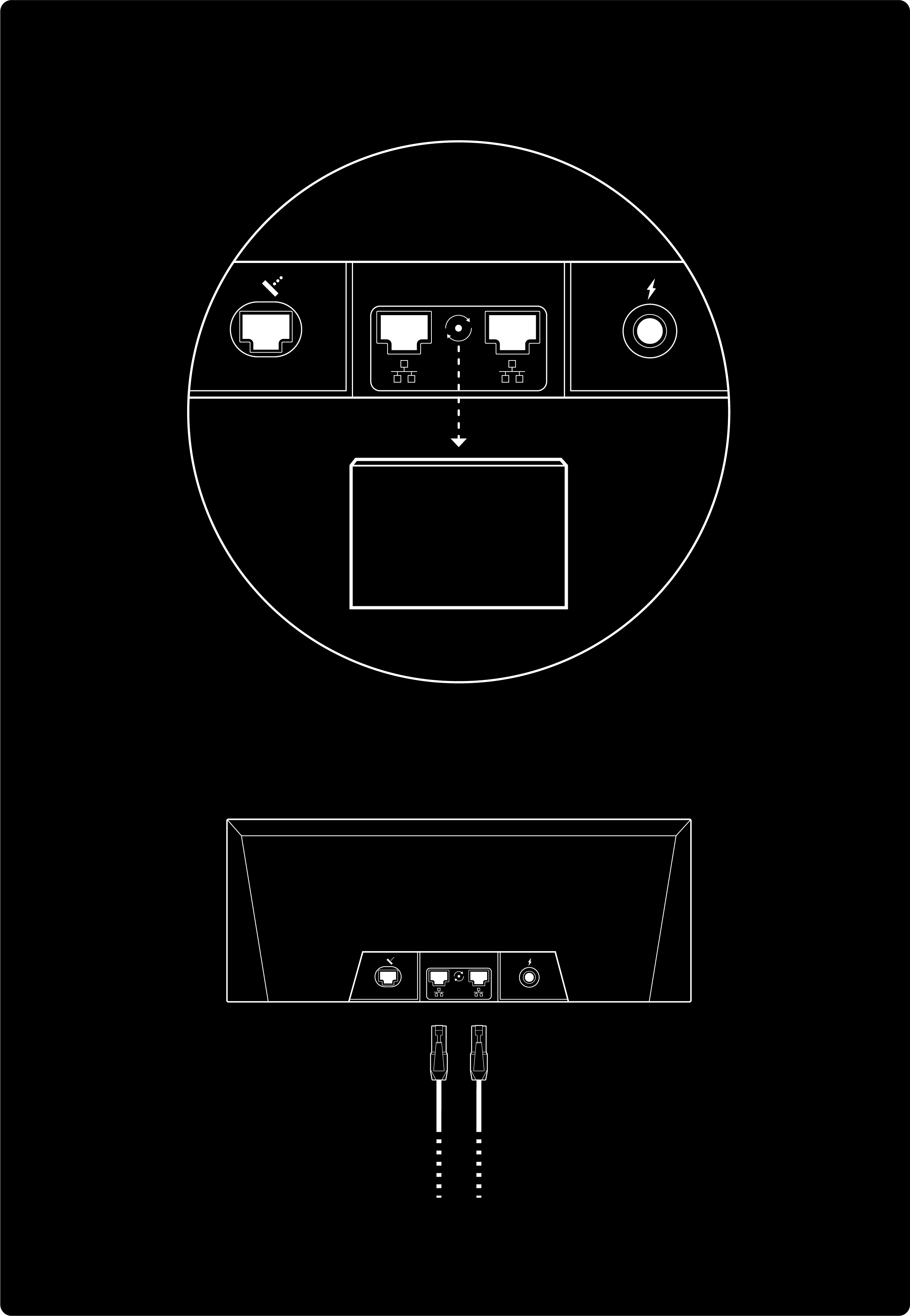
Starlink Mini. The router is inside the dish. For better coverage, add Starlink routers as wired or wireless mesh nodes rather than looking for more ports.
Network modes
Every router needs at least one network in Default mode. Beyond that you can run additional networks in any mode at the same time.
Default. Devices can see and talk to each other, which is what file sharing, screen casting and printing need. The mode to pick if you are unsure. The last Default network cannot be removed or switched to another mode.
Guest. Devices are isolated from each other and cannot reach the Starlink app, so a visitor’s laptop cannot see your devices and cannot change your settings.
Auto. For vehicles, boats and RVs. WiFi does not come on until Starlink has an internet connection, so devices that join always have working internet. If the connection drops for more than a minute the WiFi switches off and returns when the link does. This stops a phone from clinging to a WiFi network with no internet while the dish boots.
Troubleshooting
My IP geolocation is wrong or far away. Known and expected. Starlink assigns an IP in the same country as your service address, but it may place you several states, provinces or sub-regions away. Closer geolocation is being worked on and is not guaranteed today. This is what breaks region-specific search results and streaming catalogues.
I need inbound traffic. CGNAT will not do it. Move to a Priority plan with a public IP, put a third-party router behind the Starlink, or both.