
VPN Server
Run an OpenVPN or WireGuard server on the router, add users and peers, and set up the public IP and port forwarding for connecting from outside.
Overview
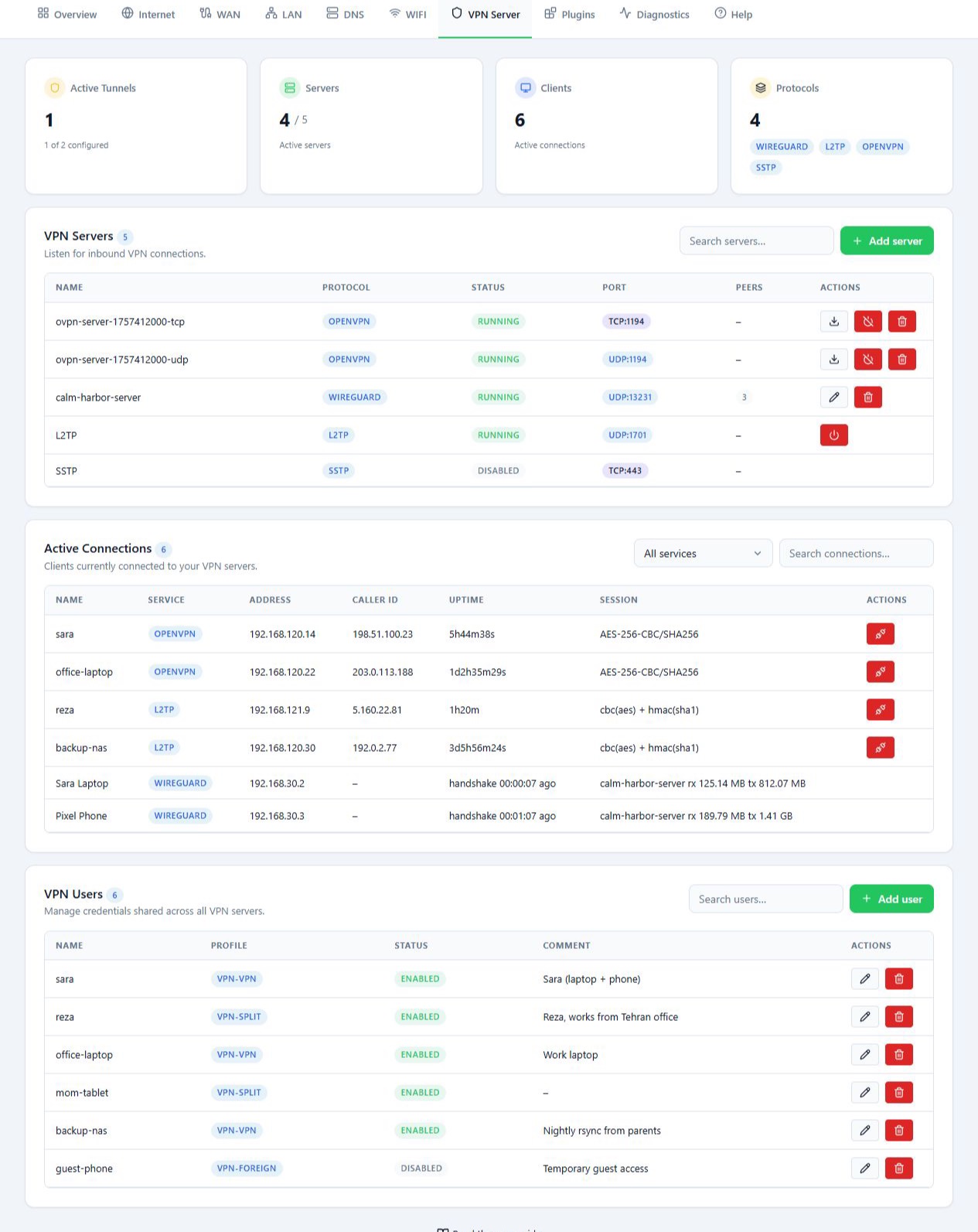
On the VPN Server tab, the MikroTik acts as a VPN server and other devices connect to it from outside your network. With the right route, connected users can use your Starlink internet.
This is different from the outbound VPNs on the WAN tab:
- With a VPN client, the MikroTik connects to another server, for example to hide the Starlink IP.
- With a VPN server, a user’s phone, computer or router connects to your MikroTik from outside the network.
The page has three main sections: VPN Servers for the servers waiting for connections, VPN Users for the accounts shared across all servers, and Active Connections for the connections that are up. Counts of active tunnels, servers, clients and protocols sit at the top.
Before you start
In the setup this guide describes, incoming connections arrive over your Iran internet. Before you create a server, check the following:
- The Iran internet line needs a reachable public IP. A static IP keeps the address from changing, but public and static are two different things. When you ask your ISP, make clear the IP must accept connections from the internet.
- If the line is behind CGNAT, port forwarding on your own router is not enough. Ask your ISP whether you can get a public IP.
- The server’s port and protocol must be forwarded from the Iran internet router to the MikroTik. The forwarding target is the MikroTik’s address on the Iran router’s network. Find it under DHCP Clients on the LAN tab.
- Inbound access must be allowed along the route and in the firewall. The port number and TCP or UDP must match the server you create.
How you set up port forwarding depends on the Iran internet router’s model. On that router, send incoming requests on the chosen port to the MikroTik’s address and the server’s port. It helps to fix or reserve the MikroTik’s address in the upstream DHCP so the forwarding target does not move.
Some routers also offer DMZ, which sends all incoming traffic for the Iran router to the MikroTik. DMZ and port forwarding are not the same. For a single server, forwarding the ports it needs is enough.
If you set the router up with Easy Config in Dual-Link mode and turned on the VPN Server step, one OpenVPN server and one user already exist.
Steps
See your servers
VPN Servers lists each server’s name, protocol, status, port and number of peers. Click a server’s name to open its details. The buttons on each row edit it, turn it on or off, download a config, or delete it.
Read each server’s port from this list and use the same port and protocol in your port forwarding.
Create an OpenVPN server
- Click Add server and choose OpenVPN.
- In Client certificate passphrase, enter a certificate passphrase that meets the form’s rules.
- Click Create OpenVPN server.
- Wait while the certificates and configuration are created.
- Check the new rows. TCP and UDP servers may show as separate rows, so check the port and status of each.
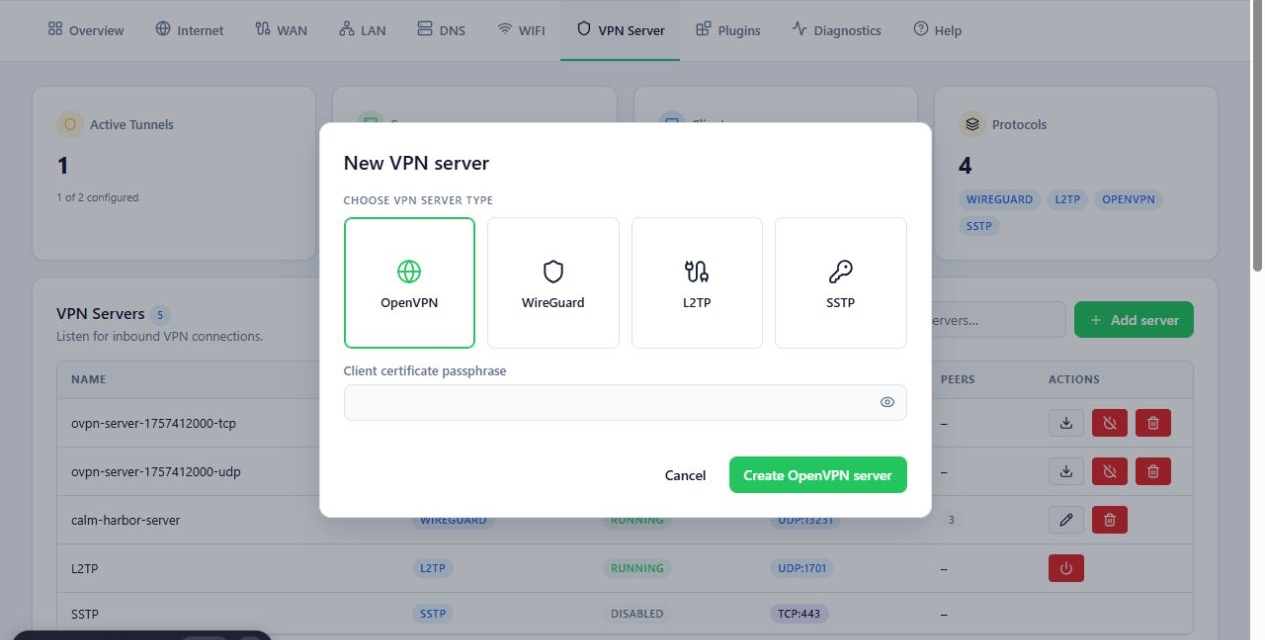
To connect with OpenVPN, also create a user under VPN Users.
Download an OpenVPN connection file
- On the server’s row, click Download client config.
- In Server public address, enter the public address of your Iran internet line that users connect to from outside.
- Click Download .ovpn.
- Import the file into the OpenVPN app on the device.
- When connecting, enter the VPN account’s username and password and, if asked, the certificate passphrase.
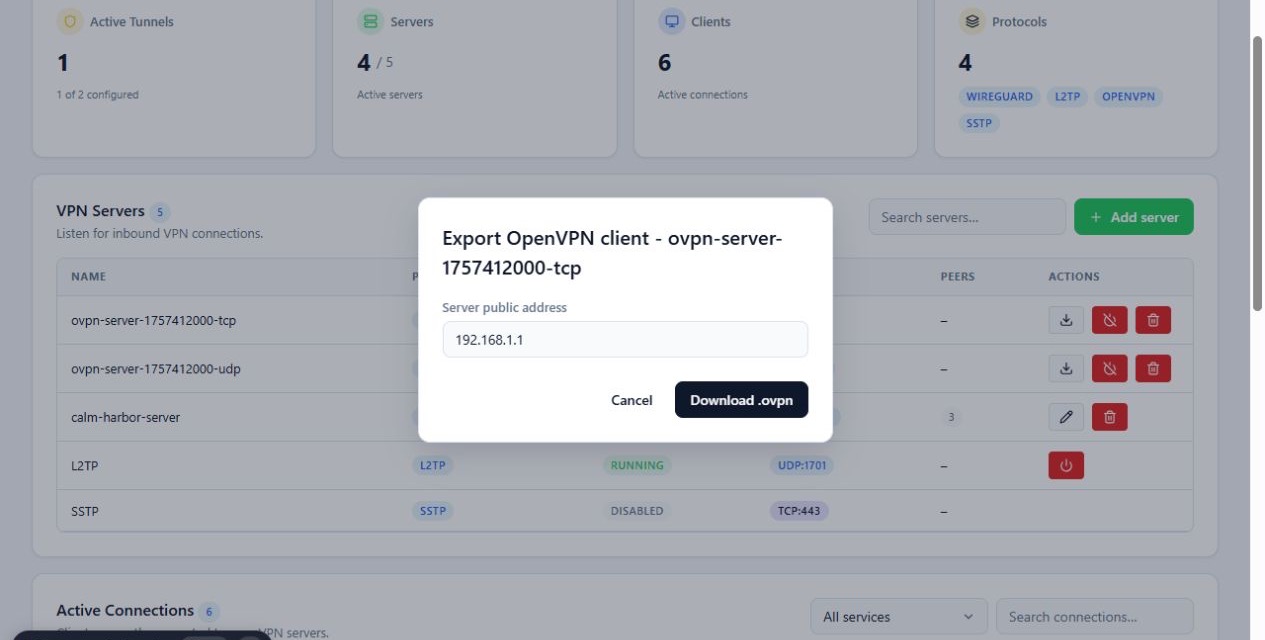
The server’s public address is not the MikroTik’s local IP. If the form suggests a local or other address, correct it. The file’s protocol and port must also match your port forwarding.
Create a WireGuard server
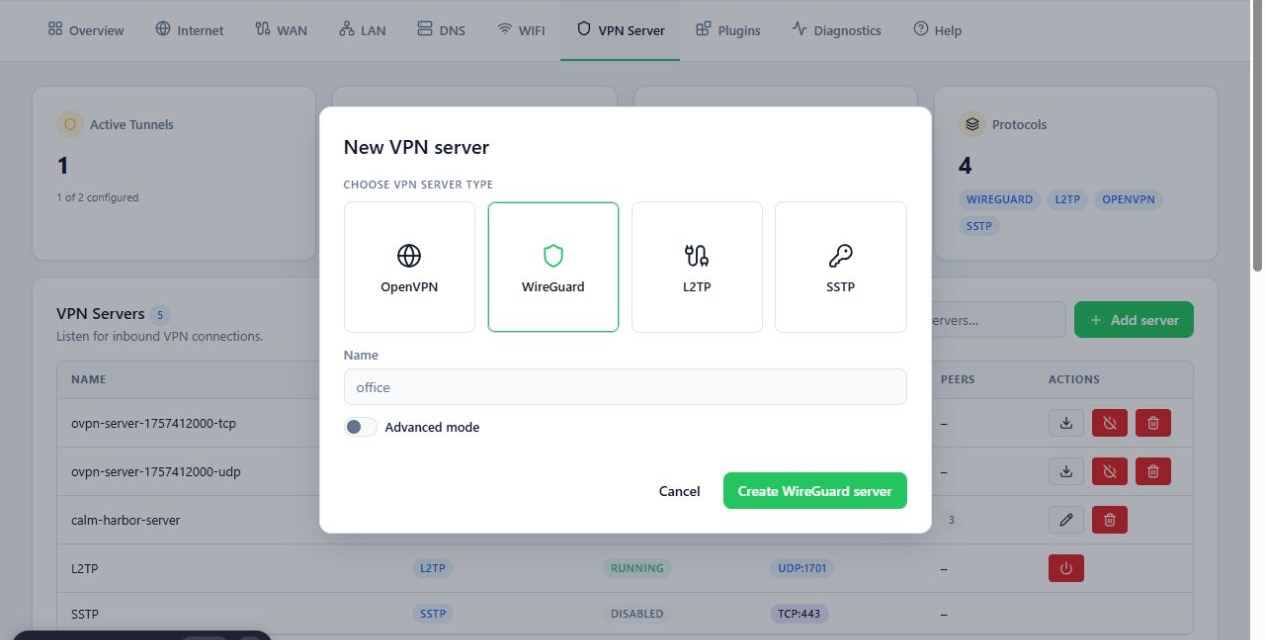
- Click Add server and choose WireGuard.
- Give the server a clear name.
- Use the automatic settings in most cases. Turn on Advanced mode only if you need to set things by hand.
- Click Create WireGuard server.
- Click the server’s name in the list to open its details and peers.
Add a peer and get its WireGuard config
Create a separate peer for each device or connection.
- In the WireGuard server’s details, click Add peer.
- Normally the panel generates the name, keys and addresses. Use Advanced mode to enter them yourself.
- Click Create peer.
- In the peer list, open Client config for that peer.
- In Server public address, enter the reachable public address of your Iran internet line.
- Click Download .conf to get the file, or Copy to copy the config text.
- Import the config into the WireGuard app on the device.
WireGuard users do not need a VPN Users account. They are managed as peers.
Config files and connection QR codes give access to your network. Share
them only with the person they belong to. In the version reviewed, WireGuard
configs were available as a .conf file and through Copy. Check whether
your version also offers a QR code.
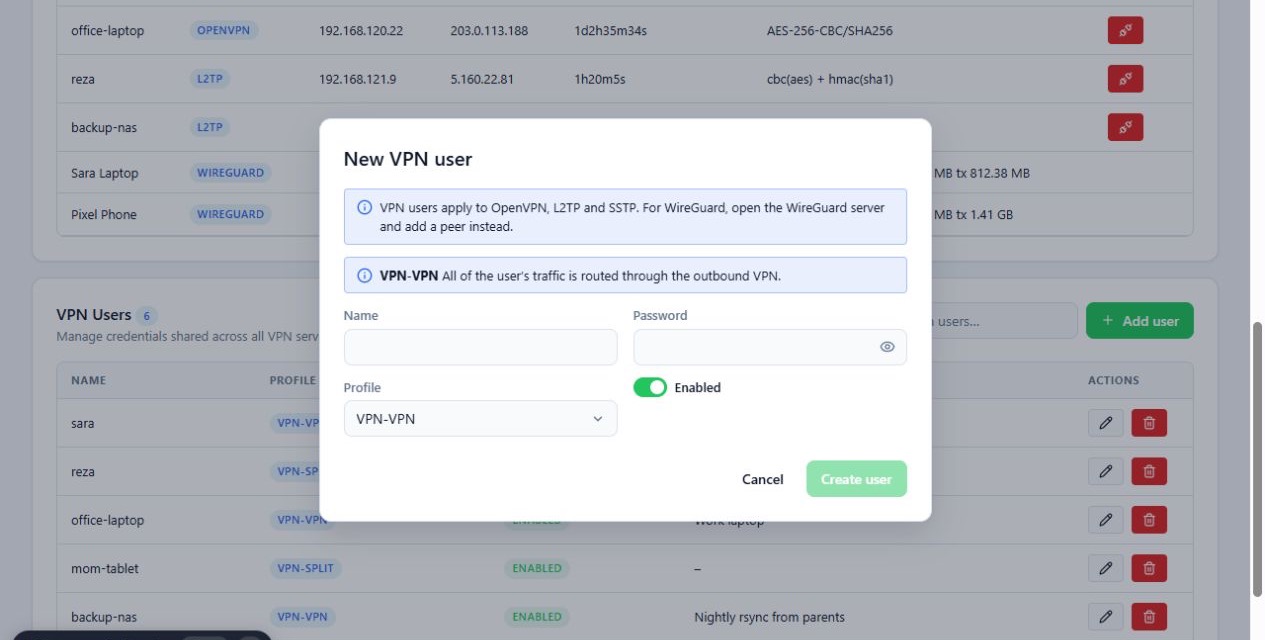
Create an account in VPN Users
This section manages accounts for OpenVPN, L2TP and SSTP. Each account is shared across all servers.
- Click Add user.
- Enter a username and password in Name and Password.
- In Profile, choose the route for this user’s traffic. See Reference.
- Check that Enabled is on.
- Click Create user.
Use Edit to change a user. Delete removes the account and its access.
Add server may also offer L2TP and SSTP. To use them, check that protocol’s form and requirements, and do not reuse one protocol’s details for another.
Check Active Connections
This section shows the connections that are up. Use Service filter and the search box to find one. Depending on the protocol, it shows the user name, address, connection time, last handshake or traffic.
WireGuard connections also appear here, but manage peers from the WireGuard server’s details. Disconnect ends the current connection. It does not delete the account.
Test from outside
- Use a device outside the MikroTik’s network, such as a phone on mobile data.
- Import the config into its VPN app and connect.
- Check the connection under Active Connections.
Reference
VPN Users profiles
| Profile | Where the user’s traffic goes |
|---|---|
| VPN-VPN | All traffic goes through the router’s outbound VPN. |
| VPN-SPLIT | Iranian destinations go over the Iran internet, everything else through the outbound VPN. |
| VPN-FOREIGN | Traffic goes straight out the foreign link, such as Starlink. The Starlink IP is not hidden. |
OpenVPN passwords
| Password | Used for |
|---|---|
| Client certificate passphrase | The connection certificate. Set when the server is created. |
| Account password in VPN Users | Each user’s own password. |
An OpenVPN connection needs both.
Deleting a server
Deleting a server also removes what belongs to it. For OpenVPN that means its users, IP pool, profile and certificates. For WireGuard, its peers and IP address.
Troubleshooting
Connecting from outside fails. Check the Iran line’s public IP, the port and protocol, the port forwarding target, the server’s status and the config file. If the line is behind CGNAT, contact your ISP.
The OpenVPN file connects to the wrong address. Check Server public address when downloading the file. It must be the public IP of your Iran internet line, not the MikroTik’s local IP.
Client config is disabled with Private key not stored on router. The
panel does not have the private key it needs to build this peer’s config. Use
the device’s original config, or create a new peer.
Failed to load VPN. The panel could not read servers, users or clients
from the router. Check the router is reachable and the credentials are valid.
Add and delete buttons are disabled. The session has no credentials for this router. Reconnect from the Routers list.