
Setup mode
The wizard's first step, where you say whether you have both Starlink and domestic internet or Starlink only.
Last updated Oct 16, 2026View as Markdown
Overview
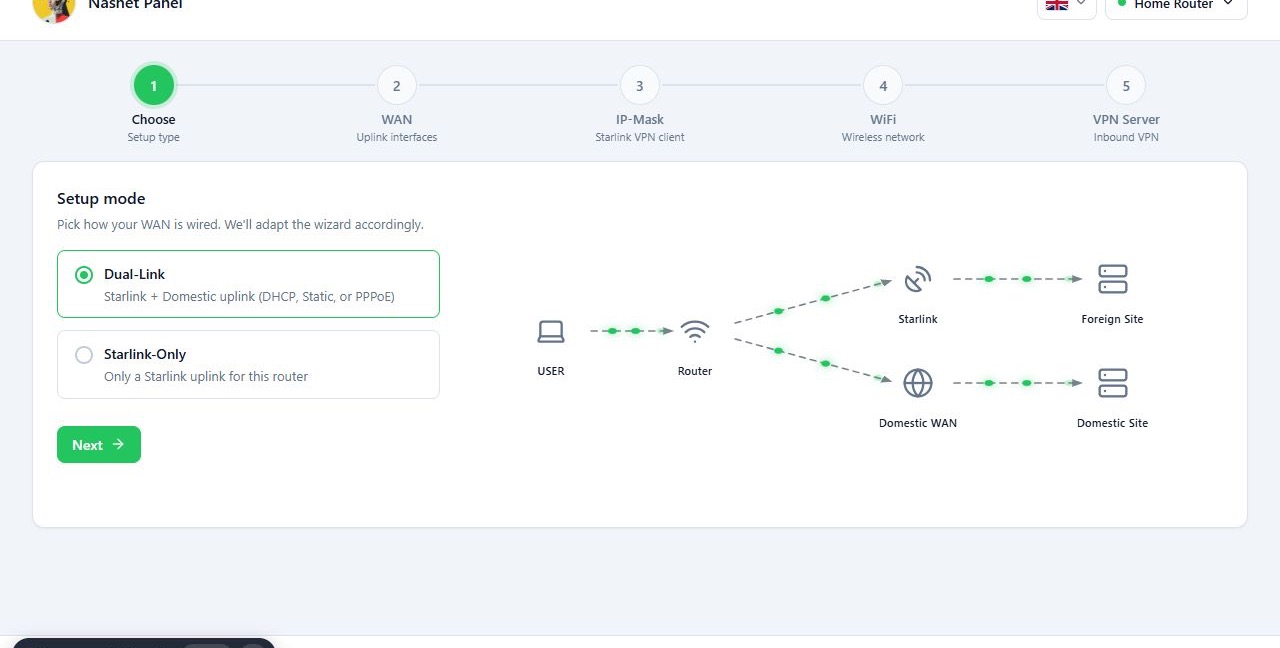
On the Setup mode page you say which connections you use. The choice decides the rest of the wizard. The diagram beside the options shows how traffic flows in each mode.
- Dual-Link: for when you have both Starlink and domestic internet. Traffic to domestic and foreign destinations can take separate paths.
- Starlink-Only: for when Starlink is your only connection. The later steps adapt to that single link.
In Dual-Link mode, traffic is split using the list of Iranian IP ranges and the router’s settings. For example, traffic to a domestic destination goes out over the domestic internet. Splitting traffic is not a security feature on its own and does not replace IP-Mask.
Before you start
- Know which internet connections are plugged into the router.
- Starlink-Only removes the VPN Server step from the wizard.
Steps
- Select Dual-Link or Starlink-Only.
- Check the diagram beside the options matches your setup.
- Press Next.
The examples in these guides use Dual-Link mode.
Reference
| Option | What it means | Effect on the wizard |
|---|---|---|
| Dual-Link | Starlink plus a domestic uplink (DHCP, Static or PPPoE). | All five steps are shown. |
| Starlink-Only | Only a Starlink uplink for this router. | The VPN Server step is not shown and the inbound VPN stays off. |
Troubleshooting
Pick a mode to continue. No mode is selected. Choose one of the two
options before pressing Next.