
WAN
The wizard's second step, where you say which port or WiFi network each internet connection enters the MikroTik on.
Overview
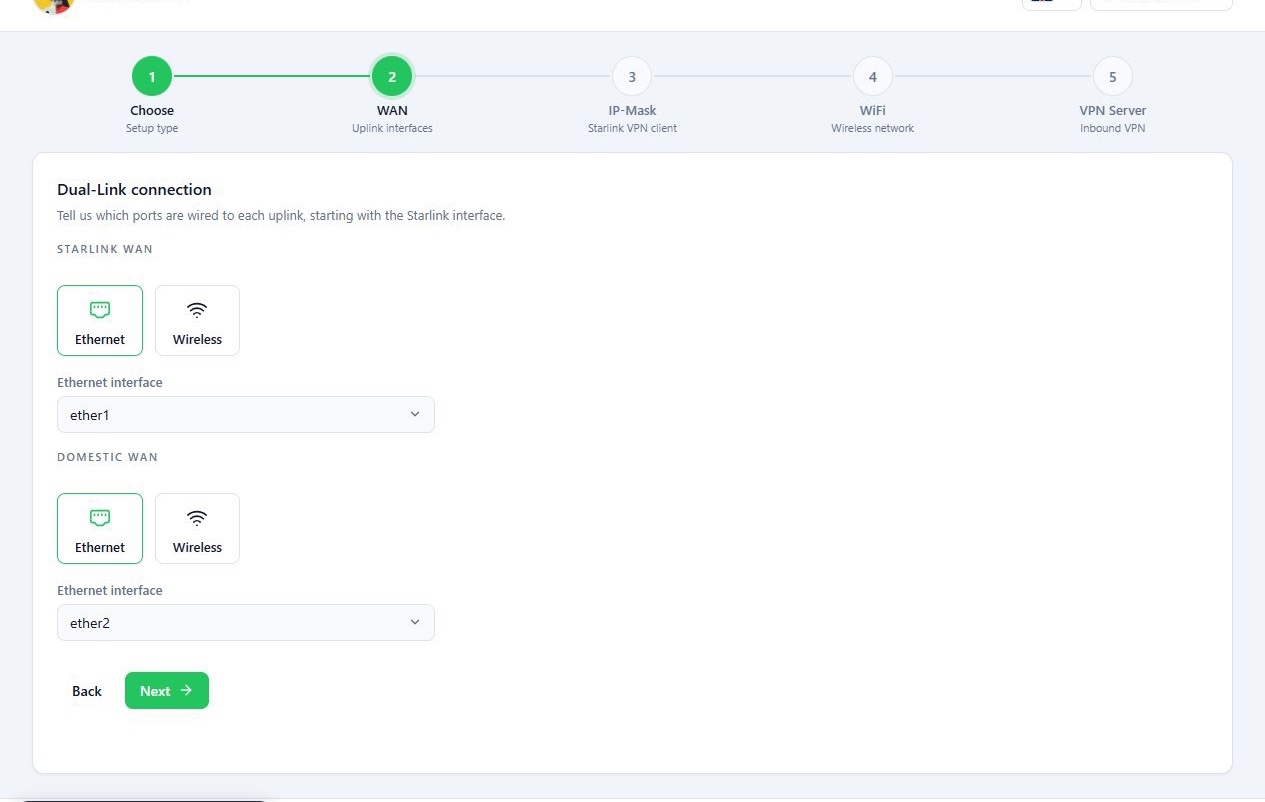
In this step you say which port or wireless interface each internet connection enters the MikroTik on. In Dual-Link mode you fill in two sections, Starlink WAN and Domestic WAN. In Starlink-Only mode only the Starlink section is shown.
Each section starts with the connection type, such as Ethernet or Wireless. Only interface types the router actually has are offered. The same port cannot be used for both connections.
Before you start
- Know which MikroTik port the Starlink cable and the domestic internet router’s cable plug into.
- For a wireless connection, have the upstream router’s WiFi name and password ready. The password must be at least 8 characters.
- The interface list is read from the router, so the panel must be connected to it.
Steps
Connecting with a network cable
- In Starlink WAN, select Ethernet.
- From the port list, pick the port the Starlink cable is plugged into, for
example
ether1. - In Domestic WAN, select Ethernet.
- Pick the port set aside for the domestic internet router, for example
ether2. - Press Next.
The port numbers in these guides are examples. Pick your router’s actual ports.
With this setup, plug in the domestic internet router’s cable after the wizard finishes. In this step you only choose its port in the panel.
Connecting over WiFi
If you want the MikroTik to reach Starlink or the domestic internet router over WiFi:
- For that connection, select Wireless.
- Pick the right wireless band (2.4 or 5) from the list.
- Press Choose wireless network and wait for nearby networks to be found.
- Pick the network and enter its password.
- Press Verify and connect and check the result.
- Press Next.
The interface you pick must support the upstream router’s band. For example, if the domestic internet router only has a 2.4 GHz network, an interface that only does 5 GHz will not connect to it.
Reference
| Field | What it does |
|---|---|
| Connection type | Ethernet or Wireless. Some routers also offer SFP and LTE. |
| Ethernet interface and other interfaces | The port or interface itself. A port already chosen for the other connection is left out of the list. |
| Choose wireless network | Scans for nearby WiFi networks so you can pick the upstream router’s. |
| Verify and connect | Joins the network with the name and password you entered and shows the result. |
Troubleshooting
Select the Starlink interface. or Select the domestic interface. No
port is selected yet. Pick one from the list.
A message says the WiFi password must be at least 8 characters. Wireless passwords need at least 8 characters. Check the upstream router’s password.
The wireless connection fails. Check the password and the band you picked. The interface must support the upstream router’s band.
The interface lists are empty. The panel could not read the interface list from the router. Reconnect to the router and reopen the wizard.