
LAN
Set each port's traffic route with bridges, check WAN addresses in DHCP Clients and manage device addresses in DHCP Leases.
Overview
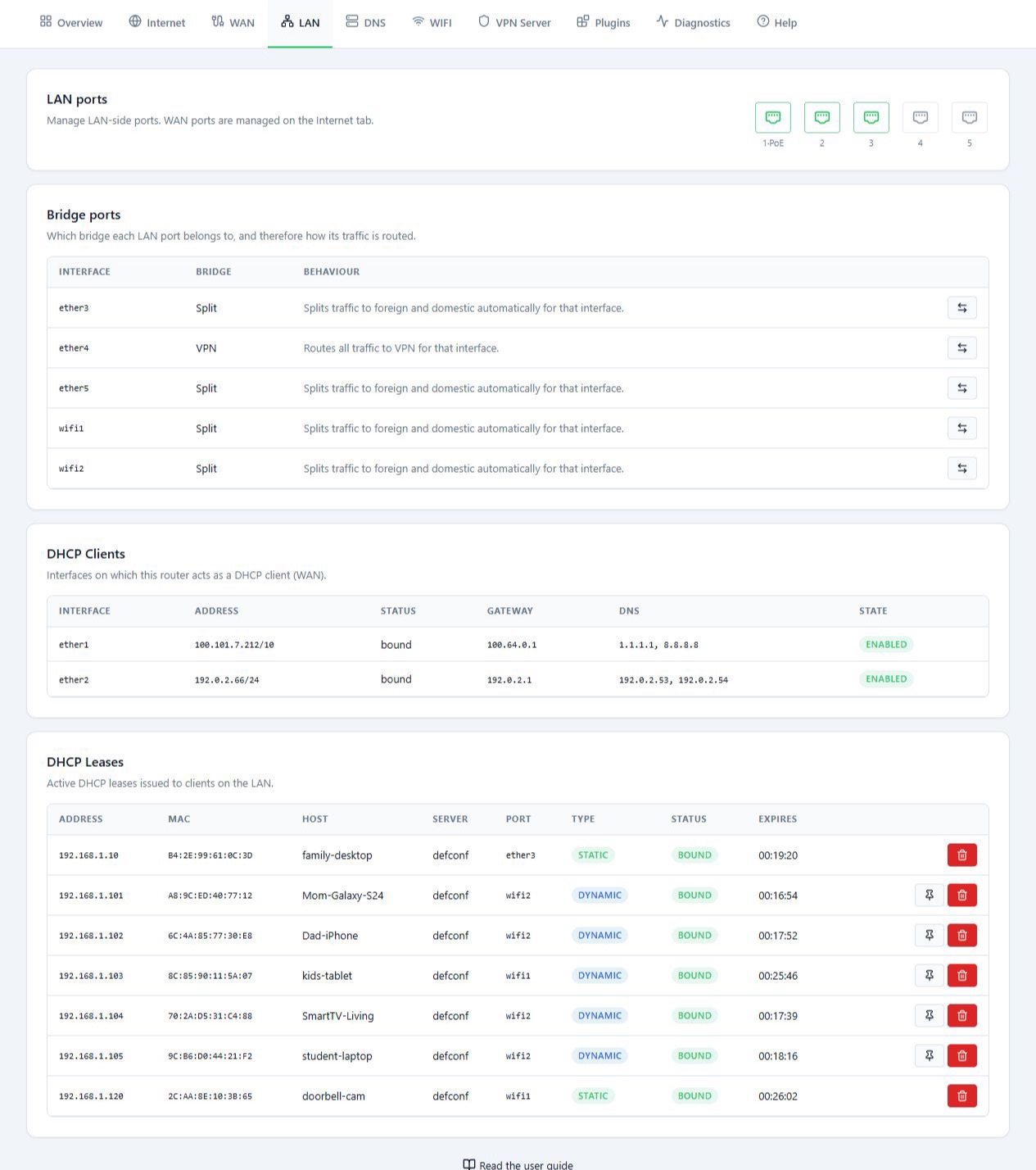
The LAN tab manages the inside of your network: the ports and interfaces that devices such as phones, computers, cameras or game consoles connect to. The page has three sections:
- Bridge ports: the traffic route for each port or WiFi interface.
- DHCP Clients: the addresses the MikroTik itself received from the upstream routers.
- DHCP Leases: the addresses the MikroTik handed out to devices on the local network.
Before you start
- WAN links are managed on the WAN tab, not here.
- If you reach the panel through the interface you are about to change, your own connection may drop for a moment.
Steps
Set each port’s route in Bridge ports
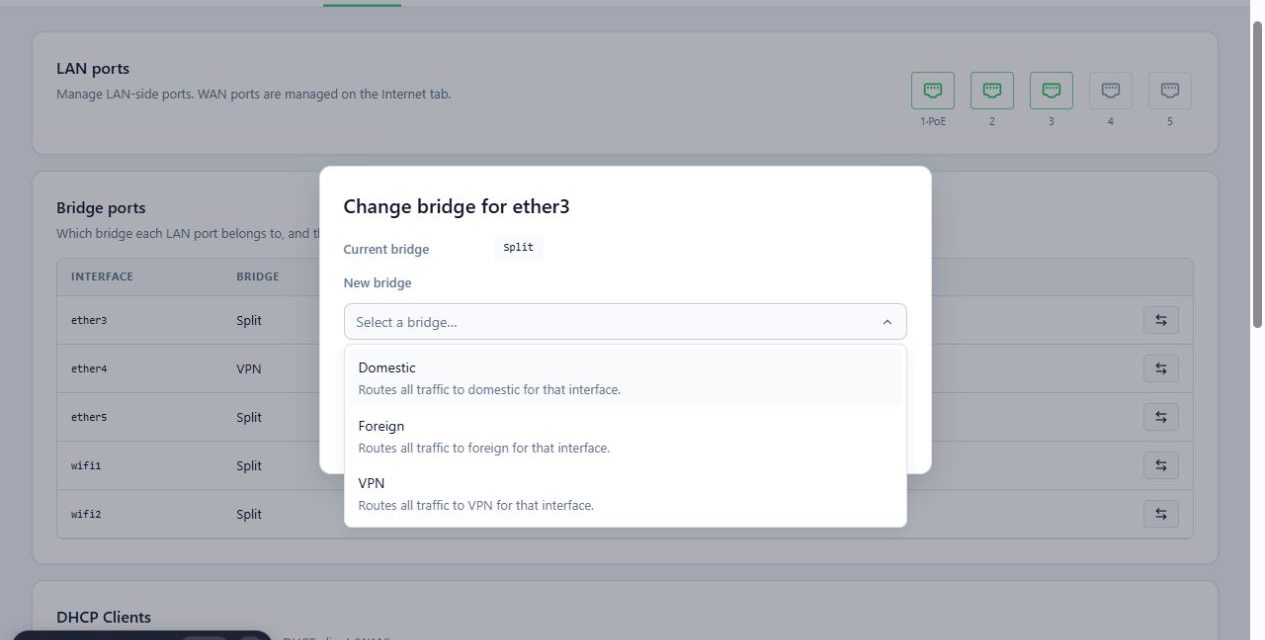
This section shows which bridge each port or WiFi interface belongs to. The group you pick decides the route for the traffic of every device connected to that interface. To change an interface’s route:
- Find the interface’s row, for example
ether4. - Click Change bridge on that row.
- In New bridge, pick the new group.
- Read the description of the change and click Change.
While the change is applied, the interface may restart and the devices on it may lose their connection for a few seconds.
This setting affects every device connected to that interface. For example, if an access point is plugged into that port, the route of every device behind it changes too.
On the direct Foreign route, traffic does not pass through the IP-masking VPN. If IP-Mask matters to you, check the final route before you change the group.
Check WAN addresses in DHCP Clients
This section shows the addresses the MikroTik itself received from upstream routers, for example on the port connected to Starlink or to the Iranian internet router. Each row shows the interface, IP address, gateway, DNS and the state of the address. A bound state usually means the address was received from DHCP.
The networks of the two WAN links must not overlap. For example, on networks
with a /24 mask, 192.168.1.1 and 192.168.1.254 are in the same range. A
different last number does not make them two separate networks. To spot an
overlap, check the Subnet Mask too, not just the first three parts of the
IP.
Manage device addresses in DHCP Leases
To find the IP of a camera, printer or other device, look it up in the list by name or MAC.
- Find the device in the DHCP Leases table.
- To make the device always get the same IP, click Make static.
- To delete the record, click Remove and confirm.
Removing a lease does not block the device. It may request an address from DHCP again.
Reference
Bridge groups
| Group | Traffic route |
|---|---|
| Split | Splits traffic between the domestic and foreign routes, following the split config. |
| Domestic | Sends traffic through the domestic internet. |
| Foreign | Sends traffic straight out of the foreign link, such as Starlink. |
| VPN | Sends traffic through the outbound VPN. |
DHCP Leases table
| Column or option | What it does |
|---|---|
| IP, MAC and device name | The assigned address and the device’s details. The name is blank if the device does not send one. |
| Port | The port or interface the device is connected to. |
| Dynamic | The address was assigned dynamically by DHCP. |
| Static | The address is a fixed reservation for this device. |
| Make static | Turns a dynamic lease into a fixed reservation. Useful for devices that need a known IP. |
| Remove | Deletes the lease record. |
Troubleshooting
The two WAN links have addresses in the same range. Change the LAN settings of one of the upstream routers, following that device’s own guide, or ask support for help.
“This router is not a DHCP client on any interface.” appears. None of the WAN links get their address from DHCP. If your WAN is static or PPPoE, this is expected.
“No active leases.” appears. Either no device has asked for an address yet, or the DHCP server is not running on the local network’s bridge.
“Missing router credentials for this session.” appears. Connect to the router again from the router list.